C4 DSL Reference
The C4 model describes software architecture at four levels: System Context, Container, Component, and Code (kUML uses UML class diagrams for Level 4). kUML supports all seven C4 view types and round-trips to the Structurizr DSL.
The C4 workspace
A C4 model is a workspace containing elements (Person, SoftwareSystem, Container, Component, DeploymentNode) and relationships. Views are projections of the workspace.
System Context
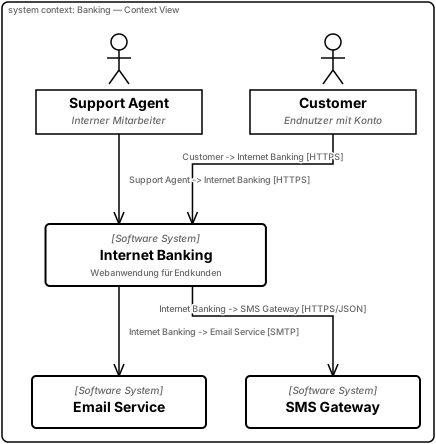
The highest-level view: the system in focus, the people who use it, and the other
systems it talks to. Rendered live below (vault source:
03 Bereiche/kUML/Beispiele/23 C4 Context – Internet Banking.md):
c4Model(name = "Internet Banking — Context") {
    val customer = person(name = "Customer") {
        description = "Endnutzer mit Konto"
    }
    val support = person(name = "Support Agent") {
        description = "Interner Mitarbeiter"
    }

    val banking = softwareSystem(name = "Internet Banking") {
        description = "Webanwendung für Endkunden"
    }
    val email = softwareSystem(name = "Email Service") {
        external = true
    }
    val sms = softwareSystem(name = "SMS Gateway") {
        external = true
    }

    relationship(source = customer, target = banking) { technology = "HTTPS" }
    relationship(source = support,  target = banking) { technology = "HTTPS" }
    relationship(source = banking,  target = email)   { technology = "SMTP" }
    relationship(source = banking,  target = sms)     { technology = "HTTPS/JSON" }

    systemContextDiagram(name = "Banking — Context View") {
        include(customer, support, banking, email, sms)
    }
}
Container
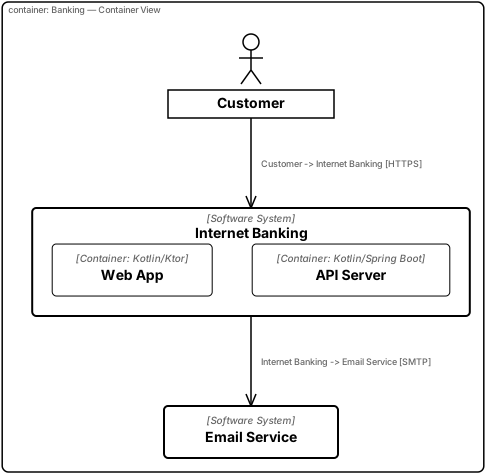
Zooms into the system in focus: the deployable/runnable units (web apps, APIs,
databases) and how they communicate. Rendered live below (vault source:
03 Bereiche/kUML/Beispiele/02 C4 Container – Internet Banking.md):
c4Model(name = "Minimal Banking System") {
    val customer = person(name = "Customer")

    val bankSystem = softwareSystem(name = "Internet Banking") {
        container(name = "Web App") {
            technology = "Kotlin/Ktor"
        }

        container(name = "API Server") {
            technology = "Kotlin/Spring Boot"
        }
    }

    val emailService = softwareSystem(name = "Email Service") {
        external = true
    }

    relationship(source = customer, target = bankSystem) { technology = "HTTPS" }
    relationship(source = bankSystem, target = emailService) { technology = "SMTP" }

    containerDiagram(name = "Banking — Container View") {
        system = bankSystem
        showExternalSystems = true
    }
}
Component
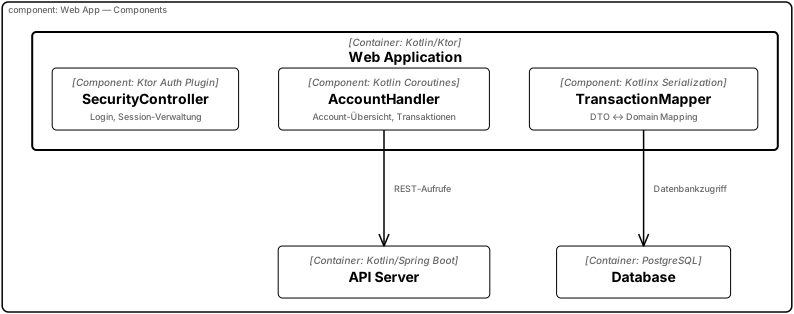
Zooms into a single container: the internal building blocks (controllers, handlers,
repositories) and their responsibilities. Rendered live below (vault source:
03 Bereiche/kUML/Beispiele/24 C4 Component – Web App Internals.md):
c4Model(name = "Internet Banking — Components") {
    val customer = person(name = "Customer")
    val banking = softwareSystem(name = "Internet Banking") {
        container(name = "Web Application") {
            technology = "Kotlin/Ktor"
            component(name = "SecurityController") {
                technology = "Ktor Auth Plugin"
                description = "Login, Session-Verwaltung"
            }
            component(name = "AccountHandler") {
                technology = "Kotlin Coroutines"
                description = "Account-Übersicht, Transaktionen"
            }
            component(name = "TransactionMapper") {
                technology = "Kotlinx Serialization"
                description = "DTO ↔ Domain Mapping"
            }
        }
        container(name = "API Server") {
            technology = "Kotlin/Spring Boot"
        }
        container(name = "Database") {
            technology = "PostgreSQL"
        }
    }

    // Resolve instances back out of the model scope
    val webApp = elements.filterIsInstance<C4Container>()
        .first { it.name == "Web Application" }
    val apiServer = elements.filterIsInstance<C4Container>()
        .first { it.name == "API Server" }
    val database = elements.filterIsInstance<C4Container>()
        .first { it.name == "Database" }
    val accountHandler = elements.filterIsInstance<C4Component>()
        .first { it.name == "AccountHandler" }
    val transactionMapper = elements.filterIsInstance<C4Component>()
        .first { it.name == "TransactionMapper" }

    relationship(source = accountHandler, target = apiServer) {
        description = "REST-Aufrufe"
    }
    relationship(source = transactionMapper, target = database) {
        description = "Datenbankzugriff"
    }

    componentDiagram(name = "Web App — Components") {
        container = webApp
        showExternalReferences = true
    }
}
Code
C4 Level 4 ("Code") is canonically a UML class diagram — kUML does not have a
dedicated C4 "Code" view type. See Mixing C4 and UML below for a worked example
that combines a C4 workspace with a classDiagram for the Level 4 view.
Dynamic
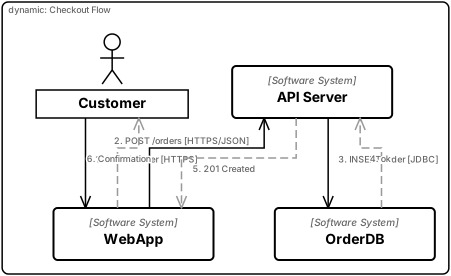
Shows a runtime scenario as a numbered sequence of interactions across containers or
components — the C4 analogue of a UML sequence diagram. Rendered live below (vault
source: 03 Bereiche/kUML/Beispiele/26 C4 Dynamic – Checkout Flow.md):
c4Model(name = "Checkout — Dynamic") {
    val customer = person(name = "Customer")
    val web      = softwareSystem(name = "WebApp")
    val api      = softwareSystem(name = "API Server")
    val db       = softwareSystem(name = "OrderDB")

    dynamicDiagram(name = "Checkout Flow", description = "Bestellung abschicken") {
        interaction(description = "Submit order",   from = customer, to = web,
                    technology = "HTTPS")
        interaction(description = "POST /orders",   from = web,      to = api,
                    technology = "HTTPS/JSON")
        interaction(description = "INSERT order",   from = api,      to = db,
                    technology = "JDBC")
        response   (description = "ok",             from = db,       to = api)
        response   (description = "201 Created",    from = api,      to = web)
        response   (description = "Confirmation",   from = web,      to = customer)
    }
}
Deployment
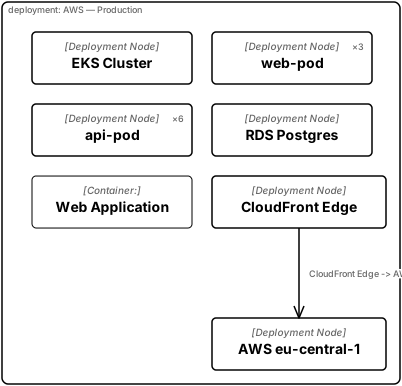
Maps containers onto the physical/virtual infrastructure that runs them — nodes,
instance counts, and communication paths. Rendered live below (vault source:
03 Bereiche/kUML/Beispiele/25 C4 Deployment – AWS Production.md):
c4Model(name = "Internet Banking — Deployment") {
    // Declare the container reference before the softwareSystem block so
    // containerInstance() can reach it inside the deploymentNode block.
    lateinit var webApp: C4Container

    val banking = softwareSystem(name = "Internet Banking") {
        location = "Internal"
        webApp = container(name = "Web Application") { technology = "Kotlin/Ktor" }
        container(name = "API Server") { technology = "Kotlin/Spring Boot" }
        container(name = "Database")   { technology = "PostgreSQL" }
    }

    val aws = deploymentNode(name = "AWS eu-central-1") {
        node(name = "EKS Cluster") {
            node(name = "web-pod") {
                instances = 3
                containerInstance(name = "Web Application", containerId = webApp.id)
            }
            node(name = "api-pod") {
                instances = 6
            }
        }
        node(name = "RDS Postgres") {
            instances = 1
        }
    }

    val edge = deploymentNode(name = "CloudFront Edge")

    relationship(source = edge, target = aws) {
        technology = "HTTPS"
        bidirectional = true
    }

    deploymentDiagram(name = "AWS — Production") {
        include(aws, edge)
    }
}
System Landscape
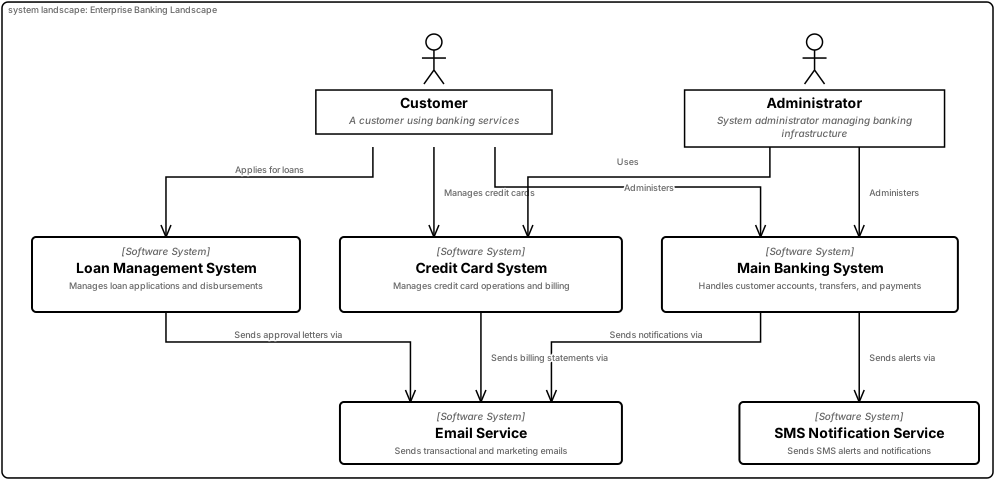
The broadest view: every top-level system and person across the whole enterprise, with
no single system in focus. Rendered live below (vault source:
03 Bereiche/kUML/Beispiele/09 C4 Landscape – Enterprise Banking.md):
c4Model(name = "Enterprise Banking Landscape") {
    val customer = person(name = "Customer") {
        description = "A customer using banking services"
    }
    val admin = person(name = "Administrator") {
        description = "System administrator managing banking infrastructure"
    }

    val mainBanking = softwareSystem(name = "Main Banking System") {
        description = "Handles customer accounts, transfers, and payments"
    }
    val creditCard = softwareSystem(name = "Credit Card System") {
        description = "Manages credit card operations and billing"
    }
    val loan = softwareSystem(name = "Loan Management System") {
        description = "Manages loan applications and disbursements"
    }
    val emailService = softwareSystem(name = "Email Service") {
        description = "Sends transactional and marketing emails"
        external = true
    }
    val smsService = softwareSystem(name = "SMS Notification Service") {
        description = "Sends SMS alerts and notifications"
        external = true
    }

    relationship(source = customer, target = mainBanking) { description = "Uses" }
    relationship(source = customer, target = creditCard) { description = "Manages credit cards" }
    relationship(source = customer, target = loan) { description = "Applies for loans" }
    relationship(source = admin, target = mainBanking) { description = "Administers" }
    relationship(source = admin, target = creditCard) { description = "Administers" }
    relationship(source = mainBanking, target = emailService) { description = "Sends notifications via" }
    relationship(source = mainBanking, target = smsService) { description = "Sends alerts via" }
    relationship(source = creditCard, target = emailService) { description = "Sends billing statements via" }
    relationship(source = loan, target = emailService) { description = "Sends approval letters via" }

    systemLandscapeDiagram(name = "Enterprise Banking Landscape") {
        description = "High-level overview of all systems and users in the banking enterprise"
    }
}
Round-trip with Structurizr
kUML can export to and import from Structurizr DSL:
# Export your kUML C4 to Structurizr
kuml export workspace.kuml.kts --format structurizr --output workspace.dsl

# Read back (parse-only — for verification)
kuml parse workspace.dsl --format structurizr
The export emits valid Structurizr DSL that the Structurizr CLI and the Structurizr Lite viewer consume directly. Useful for sharing with teams that have a Structurizr investment.
See Structurizr export for the full mapping table and round-trip guarantees.
Mixing C4 and UML
A single workspace can include both C4 views and UML class/state diagrams. C4 Level 4 ("Code") is canonically a UML class diagram — keep both in one script:
umlModel(name = "Banking system") {
    c4Model(name = "Banking") {
        softwareSystem("Internet Banking") {
            container("API") {
                component("AccountController")
            }
        }
    }

    containerDiagram(name = "Container view") {
        system = "Internet Banking"
    }

    // Level 4: the actual class structure of AccountController
    classDiagram(name = "AccountController internals") {
        classOf("AccountController") {
            attribute("repo", "TransactionRepository")
            operation("getBalance") { returnType = "Money" }
        }
    }
}
Stereotypes and styling
C4 elements accept stereotypes for thematic styling. The default themes (plain, kuml,
elegant, playful) all honour the C4 stock styles. Custom themes can map stereotypes to
colours, shapes, and stroke widths — see themes & config.