SysML 2 DSL Reference
SysML 2 is kUML’s second modelling language — a domain-specific language for systems engineering defined by OMG SysML v2.0. While the UML DSL focuses on software structure and behaviour, SysML 2 is purpose-built for modelling physical and cyber-physical systems: requirements, functional breakdown, parametric constraints, and executable state behaviour.
The SysML 2 DSL entry point is sysml2Model:
sysml2Model("SystemName") {
    // diagram builders go here
}
Every diagram builder is also usable at top level without the sysml2Model wrapper — the
wrapper is only needed when a single script contains multiple SysML 2 diagrams.
Diagram types at a glance
| Abbreviation | Full name | Builder | Use it for |
|---|---|---|---|
BDD |
Block Definition Diagram |
|
Structural decomposition: blocks, value properties, ports, part/reference associations. |
IBD |
Internal Block Diagram |
|
Internal wiring: parts within a block, connectors between ports, item flows. |
UC |
Use Case Diagram |
|
Actor goals: system actors, use cases, include/extend relationships. |
REQ |
Requirements Diagram |
|
Stakeholder requirements: requirements, derives, satisfies, verifies, contains links. |
STM |
State Machine Diagram |
|
Executable discrete behaviour: states, transitions, trigger/guard/action triples. |
ACT |
Activity Diagram |
|
Executable workflow: actions, decisions, forks/joins, item flows, object flows. |
SEQ |
Sequence Diagram |
|
Time-ordered interaction between blocks: lifelines, messages, combined fragments. |
PAR |
Parametric Diagram |
|
Constraint properties: parameters, equations, numerical constraints. |
Block Definition Diagrams (BDD)
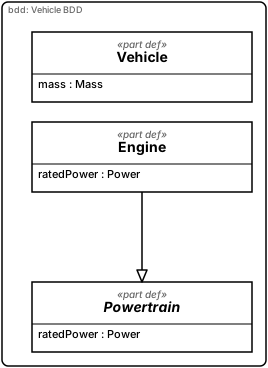
BDD is the SysML 2 analogue of the UML class diagram. The central classifier is block.
Rendered live below (vault source:
03 Bereiche/kUML/Beispiele/03 SysML 2 BDD – Hybrid Vehicle.md):
import dev.kuml.sysml2.dsl.sysml2Model

sysml2Model(name = "VehicleSystem") {
    val massType = attributeDef(name = "Mass")
    val powerType = attributeDef(name = "Power")

    // Abstract base definition — cannot be instantiated directly
    val powertrain = partDef(name = "Powertrain", isAbstract = true) {
        attribute(name = "ratedPower", typeId = powerType.id)
    }

    val vehicle = partDef(name = "Vehicle") {
        attribute(name = "mass", typeId = massType.id)
    }

    // Specialisation: Engine is a concrete Powertrain flavour
    val engine = partDef(name = "Engine", specializesId = powertrain.id) {
        attribute(name = "ratedPower", typeId = powerType.id)
    }

    bdd(name = "Vehicle BDD") {
        include(definition = powertrain)
        include(definition = vehicle)
        include(definition = engine)
    }
}
Key BDD elements:
| Element | Notes |
|---|---|
|
The top-level SysML 2 classifier. Supports |
|
A typed scalar or structured value. |
|
A typed part (composition by reference to another block type). |
|
|
|
Whole/part relationship. Renders as filled diamond. |
|
Non-ownership association. Block args or string names. |
Internal Block Diagrams (IBD)
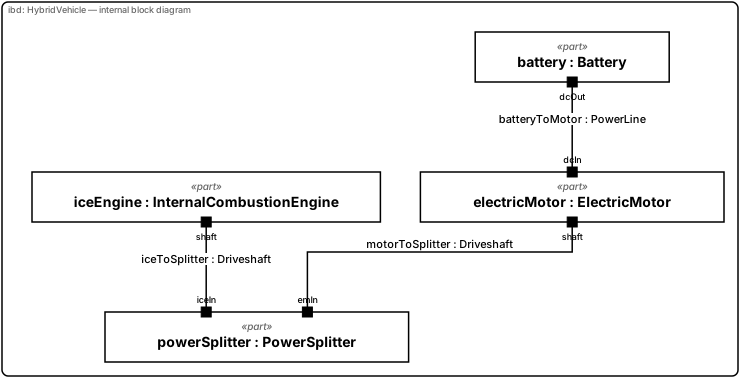
IBD shows the internal wiring of a single block context: parts, ports, and connectors
between them. Rendered live below (vault source:
03 Bereiche/kUML/Beispiele/27 SysML 2 IBD – Hybrid Vehicle Wiring.md):
import dev.kuml.sysml2.dsl.sysml2Model

sysml2Model(name = "HybridVehicleSystem") {
    val powerLine  = connectionDef(name = "PowerLine")
    val driveshaft = connectionDef(name = "Driveshaft")

    val dcPort    = portDef(name = "DcPort")
    val shaftPort = portDef(name = "ShaftPort")

    val battery = partDef(name = "Battery") {
        port(name = "dcOut", typeId = dcPort.id)
    }
    val electricMotor = partDef(name = "ElectricMotor") {
        port(name = "dcIn",  typeId = dcPort.id)
        port(name = "shaft", typeId = shaftPort.id)
    }
    val iceEngine = partDef(name = "InternalCombustionEngine") {
        port(name = "shaft", typeId = shaftPort.id)
    }
    val powerSplitter = partDef(name = "PowerSplitter") {
        port(name = "emIn",  typeId = shaftPort.id)
        port(name = "iceIn", typeId = shaftPort.id)
    }

    val hybrid = partDef(name = "HybridVehicle") {
        part(name = "battery",       typeId = battery.id)
        part(name = "electricMotor", typeId = electricMotor.id)
        part(name = "iceEngine",     typeId = iceEngine.id)
        part(name = "powerSplitter", typeId = powerSplitter.id)

        connect(
            name = "batteryToMotor",
            typeId = powerLine.id,
            sourceEndId = "HybridVehicle::battery::dcOut",
            targetEndId = "HybridVehicle::electricMotor::dcIn",
        )
        connect(
            name = "motorToSplitter",
            typeId = driveshaft.id,
            sourceEndId = "HybridVehicle::electricMotor::shaft",
            targetEndId = "HybridVehicle::powerSplitter::emIn",
        )
        connect(
            name = "iceToSplitter",
            typeId = driveshaft.id,
            sourceEndId = "HybridVehicle::iceEngine::shaft",
            targetEndId = "HybridVehicle::powerSplitter::iceIn",
        )
    }

    ibd(name = "HybridVehicle — internal block diagram", owner = hybrid)
}
Use Case Diagrams (UC)
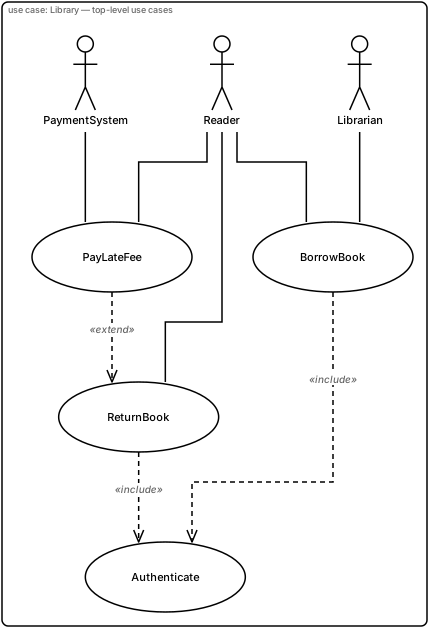
SysML 2 use case syntax mirrors UML use case: actors, use cases, include/extend
relationships. Rendered live below (vault source:
03 Bereiche/kUML/Beispiele/05 SysML 2 UC – Library System.md):
import dev.kuml.sysml2.dsl.sysml2Model

sysml2Model(name = "LibrarySystem") {
    val reader = actorDef(name = "Reader")
    val librarian = actorDef(name = "Librarian")
    val paymentSystem = actorDef(name = "PaymentSystem")

    val borrowBook = useCaseDef(name = "BorrowBook")
    val returnBook = useCaseDef(name = "ReturnBook")
    val payLateFee = useCaseDef(name = "PayLateFee")
    val authenticate = useCaseDef(name = "Authenticate")

    ucDiagram(name = "Library — top-level use cases") {
        include(definition = reader)
        include(definition = librarian)
        include(definition = paymentSystem)
        include(definition = borrowBook)
        include(definition = returnBook)
        include(definition = payLateFee)
        include(definition = authenticate)

        association(actor = reader, useCase = borrowBook)
        association(actor = reader, useCase = returnBook)
        association(actor = reader, useCase = payLateFee)
        association(actor = librarian, useCase = borrowBook)
        association(actor = paymentSystem, useCase = payLateFee)

        // «include»: target is always executed as part of source
        include(source = borrowBook, target = authenticate)
        include(source = returnBook, target = authenticate)

        // «extend»: target's behaviour is optionally extended by source
        extend(source = payLateFee, target = returnBook)
    }
}
System boundaries, actor generalisation and descriptions
subject("Name") { include(useCase) } draws a system boundary. The use cases inside the block become
children of the frame; actors never do, so they always stay outside. Several frames sit side by side.
generalize(specific, general) draws an actor generalisation (solid line, hollow triangle at the general
actor). useCaseDef(description = "…") shows an italic description (at most four lines, longer text is
cut with an ellipsis and kept in the tooltip) inside the ellipse.
import dev.kuml.sysml2.dsl.sysml2Model

sysml2Model("Library") {
    val user = actorDef("User")
    val reader = actorDef("Reader")
    val librarian = actorDef("Librarian")
    val borrow = useCaseDef("Borrow Book", description = "A reader borrows a book for up to four weeks. The system checks the account and records the loan.")
    val auth = useCaseDef("Authenticate")
    val fee = useCaseDef("Pay Late Fee")
    val manage = useCaseDef("Manage Catalogue", description = "Add, change or remove titles in the catalogue of the library system.")
    val export = useCaseDef("Export Report")
    ucDiagram("Library system") {
        include(user)
        include(reader)
        include(librarian)
        include(borrow)
        include(auth)
        include(fee)
        include(manage)
        include(export)
        generalize(reader, user)
        generalize(librarian, user)
        association(reader, borrow)
        association(librarian, manage)
        association(librarian, export)
        include(borrow, auth)
        extend(fee, borrow)
        subject("Lending") {
            include(borrow)
            include(auth)
            include(fee)
        }
        subject("Administration") {
            include(manage)
            include(export)
        }
    }
}
Requirements Diagrams (REQ)
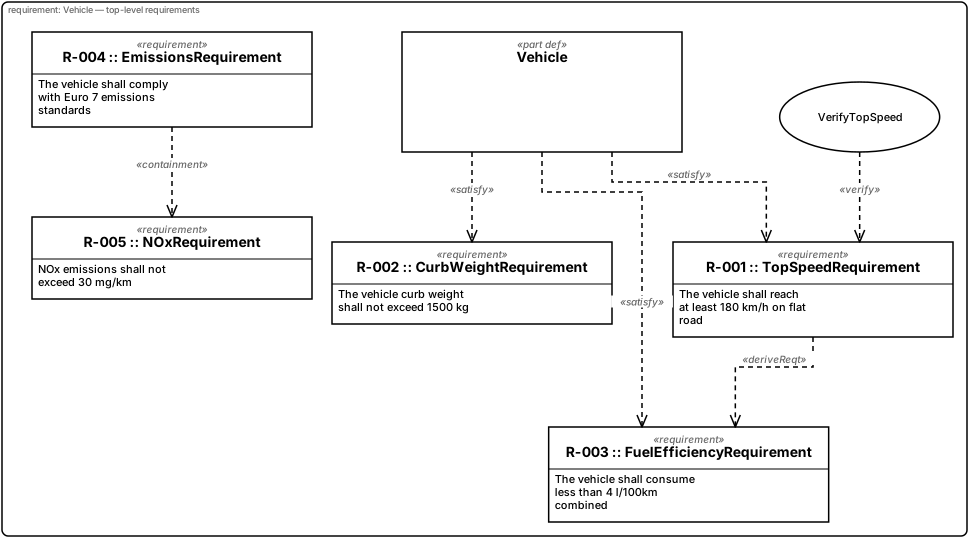
Requirements diagrams trace stakeholder needs through derivation, satisfaction,
verification, and containment. Rendered live below (vault source:
03 Bereiche/kUML/Beispiele/08 SysML 2 REQ – Vehicle Requirements.md):
import dev.kuml.sysml2.dsl.sysml2Model

sysml2Model(name = "VehicleRequirements") {
    val topSpeed = requirementDef(
        name = "TopSpeedRequirement",
        reqId = "R-001",
        text = "The vehicle shall reach at least 180 km/h on flat road",
        subject = "Vehicle",
    )
    val curbWeight = requirementDef(
        name = "CurbWeightRequirement",
        reqId = "R-002",
        text = "The vehicle curb weight shall not exceed 1500 kg",
        subject = "Vehicle",
    )
    val fuelEfficiency = requirementDef(
        name = "FuelEfficiencyRequirement",
        reqId = "R-003",
        text = "The vehicle shall consume less than 4 l/100km combined",
        subject = "Vehicle",
    )
    val emissions = requirementDef(
        name = "EmissionsRequirement",
        reqId = "R-004",
        text = "The vehicle shall comply with Euro 7 emissions standards",
        subject = "Vehicle",
    )
    val nox = requirementDef(
        name = "NOxRequirement",
        reqId = "R-005",
        text = "NOx emissions shall not exceed 30 mg/km",
        subject = "Vehicle",
    )

    val vehicle = partDef(name = "Vehicle")
    val verifyTopSpeed = useCaseDef(name = "VerifyTopSpeed")

    reqDiagram(name = "Vehicle — top-level requirements") {
        include(definition = topSpeed)
        include(definition = curbWeight)
        include(definition = fuelEfficiency)
        include(definition = emissions)
        include(definition = nox)
        include(definition = vehicle)
        include(definition = verifyTopSpeed)

        satisfy(source = vehicle, requirement = topSpeed)
        satisfy(source = vehicle, requirement = curbWeight)
        satisfy(source = vehicle, requirement = fuelEfficiency)

        verify(source = verifyTopSpeed, requirement = topSpeed)

        // Endgeschwindigkeit vs. Verbrauch ist ein klassischer Trade-off
        derive(source = topSpeed, target = fuelEfficiency)

        contains(parent = emissions, child = nox)
    }
}
Requirement attributes, test cases, groups and relationships
requirementDef accepts priority (HIGH, MEDIUM, LOW), status (DRAFT … VERIFIED), source,
isAssumption = true (dashed border, [assumption]) and subjectRef (the id of the constrained element;
the diagram then draws a [subject] edge). The free-text subject stays available. Titles are wrapped
instead of truncated; the box width is between 160 and 240 px and the height grows with the content.
testCaseDef adds a verification element (rounded box, [testCase]). group("Name") { … } draws a framed
group with a name tab; groups nest up to three levels and an element belongs to at most one group.
New relationships: refine(source, requirement), trace(source, target) and copy(slave, master).
import dev.kuml.sysml2.RequirementPriority
import dev.kuml.sysml2.RequirementStatus
import dev.kuml.sysml2.dsl.sysml2Model

sysml2Model("Vehicle Requirements") {
    val car = partDef("Car")
    val brakes = partDef("BrakeSystem")
    val top = requirementDef(
        "TopSpeed",
        reqId = "R-001",
        text = "The vehicle shall reach at least 180 km/h on flat road within 30 seconds.",
        priority = RequirementPriority.HIGH,
        status = RequirementStatus.APPROVED,
        source = "Marketing, Product Brief 2026",
        subjectRef = "Car",
    )
    val stop = requirementDef(
        "StoppingDistanceFromHundredKilometresPerHourOnDryAndWetRoadSurfaces",
        reqId = "R-002",
        text = "The vehicle shall stop from 100 km/h within 36 metres on a dry road.",
        priority = RequirementPriority.MEDIUM,
        status = RequirementStatus.DRAFT,
    )
    val stopCopy = requirementDef(
        "StoppingCopy",
        text = "The vehicle shall stop from 100 km/h within 36 metres on a dry road.",
    )
    val dry = requirementDef(
        "DryRoadAssumption",
        text = "Tests are run on dry asphalt at 20 degrees Celsius.",
        isAssumption = true,
    )
    val abs = requirementDef("AbsRequired", text = "ABS is mandatory.", priority = RequirementPriority.LOW)
    val speedTest = testCaseDef("TopSpeedTest", text = "Accelerate on the test track.")
    val driving = useCaseDef("DriveFast")
    reqDiagram("Vehicle requirements") {
        include(car)
        include(brakes)
        include(driving)
        include(top)
        include(speedTest)
        group("Performance") {
            include(top)
            group("Braking") {
                include(stop)
                group("Details") {
                    include(stopCopy)
                    include(abs)
                }
            }
        }
        include(dry)
        satisfy(car, top)
        satisfy(brakes, stop)
        verify(speedTest, top)
        derive(abs, stop)
        contains(stop, abs)
        refine(driving, top)
        trace(dry, stop)
        copy(stopCopy, stop)
    }
}
Structural checks (kuml validate, REQ and UC)
Code |
Severity |
Rule |
201 |
Error |
|
202 |
Error |
|
203 |
Error |
|
204 |
Error |
Groups nested deeper than 3 levels (or a group cycle) |
205 |
Error |
A use case is inside more than one subject frame |
206 / 207 |
Error |
Actor generalisation cycle / a side is not an actor |
208 |
Error |
A requirement is a member of more than one group |
209-212 |
Error |
Limits: title 200, requirement text 2000, source 200, use-case description 1000 characters |
213 / 214 |
Error |
More than 64 groups / 16 subject frames in one diagram |
215 |
Warning |
|
216 |
Warning |
|
217 |
Hint |
Use-case description longer than four lines (truncated in the diagram) |
trace is intentionally unchecked. Renderers additionally cut over-long text defensively, so a plain
kuml render without validate cannot blow up the layout.
State Machine Diagrams (STM)
STM is the primary entry point for executable behaviour in SysML 2. kUML implements
SysML 2 state machines on top of the same runtime as UML state machines — kuml simulate
works for both.
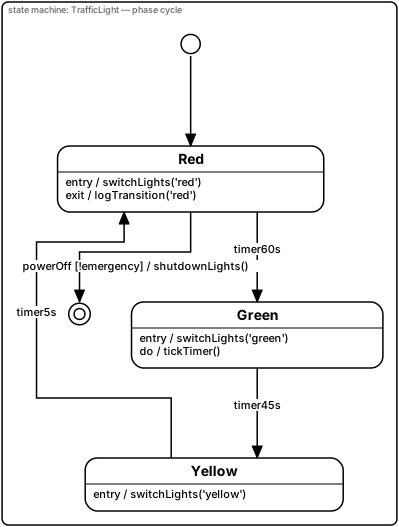
Rendered live below (vault source:
03 Bereiche/kUML/Beispiele/04 SysML 2 STM – Traffic Light.md):
import dev.kuml.sysml2.dsl.sysml2Model

sysml2Model(name = "TrafficLight") {
    val initial = stateDef(name = "Initial", isInitial = true)
    val red = stateDef(
        name = "Red",
        entryAction = "switchLights('red')",
        exitAction = "logTransition('red')",
    )
    val green = stateDef(
        name = "Green",
        entryAction = "switchLights('green')",
        doAction = "tickTimer()",
    )
    val yellow = stateDef(
        name = "Yellow",
        entryAction = "switchLights('yellow')",
    )
    val off = stateDef(name = "Off", isFinal = true)

    transition(name = "init", source = initial, target = red)
    transition(name = "redToGreen", source = red, target = green, trigger = "timer60s")
    transition(name = "greenToYellow", source = green, target = yellow, trigger = "timer45s")
    transition(name = "yellowToRed", source = yellow, target = red, trigger = "timer5s")
    transition(
        name = "powerOff",
        source = red,
        target = off,
        trigger = "powerOff",
        guard = "!emergency",
        effect = "shutdownLights()",
    )

    stmDiagram(name = "TrafficLight — phase cycle") {
        include(state = initial)
        include(state = red)
        include(state = green)
        include(state = yellow)
        include(state = off)
    }
}
Run the machine with a JSON events file:
kuml simulate thermostat.kuml.kts --events thermostat-events.jsonSee State-Machine Simulation for the full events/trace format, golden trace verification, and interactive REPL mode.
kuml simulate supports both UML stateDiagram { stateMachine { … } } and
SysML 2 sysml2Model { stateDef / transition } syntaxes. The underlying runtime is shared.
|
Composite states, regions and pseudo-states
State machines can be nested. A state is made composite by giving other states a parent; orthogonal regions
are declared with region(owner, "name") and children pick one with region = r.
sysml2Model("Pipeline") {
    val par = stateDef("Parallel")
    val left = region(par, "Left")
    val right = region(par, "Right")
    val load = stateDef("Load", parent = par, region = left)
    val fetch = stateDef("Fetch", parent = par, region = right)
    val split = fork("Split")
    val merge = join("Merge")
    history("H", deep = true, parent = par)   // H* ; parent is mandatory
    choice("Decide"); junction("Merge2")
    // ... transitions as usual
    stmDiagram("Pipeline") { include(par); include(split); include(merge) }
}
Including a composite shows all its descendants; including only a child also shows its ancestors.
region(…) replaces the owner definition in the model, so refer to states by id afterwards, not through an
old variable.
Transitions may end on a composite frame. Transitions between a composite and one of its own descendants are routed to the frame and flagged by warning 115.
Structural checks (kuml validate)
Code |
Severity |
Rule |
101 |
Error |
Initial state has an incoming transition |
102 |
Error |
Final state has an outgoing transition |
103 / 104 |
Error |
Fork targets / join sources are not in pairwise different regions |
105 / 106 |
Error |
Fork needs 1 in and 2+ out; join needs 2+ in and 1 out |
107 / 108 |
Error / Warning |
Choice without outgoing transition / without guard-less else branch |
109 |
Error |
Junction needs incoming and outgoing transitions |
110-112 |
Error |
History: no parent / duplicate per region / several default transitions |
113 |
Error |
Direct transition between two regions of a composite (use fork/join) |
114 |
Error |
More than one initial state in a region of a composite |
115 |
Warning |
Transition between a composite and its own descendant |
116-119 |
Error |
Dangling parent, bad region, pseudo-state as parent, duplicate or colliding region ids |
120-123 |
Error |
Limits: depth 16 (and parent cycles), 16 regions, 1000 states, 256 characters per name |
124 |
Error |
A transition has both a |
125 |
Error |
|
126 |
Error |
Timer on a transition that leaves a pseudo-state |
127 |
Warning |
Two |
128 |
Error |
|
129 |
Error |
Guard, effect or prose longer than 512 characters |
Timers
A transition takes a time trigger instead of an event name:
import kotlin.time.Duration.Companion.seconds

transition(name = "redToGreen", source = red, target = green, timer = after(duration = 30.seconds))
transition(name = "nightMode", source = red, target = night, timer = at(iso = "2026-12-24T22:00:00Z"))
after is armed when the source state is entered and discarded when it is left; at is an absolute UTC instant
(ISO-8601 with Z, millisecond precision) that fires on the next advance if it already lies in the past. timer and
trigger are mutually exclusive (code 124). Diagrams label the edge after(30s) / at(2026-12-24T22:00:00Z).
The simulator runs timers on a deterministic virtual clock (default start 2000-01-01T00:00:00Z, or
--start-time <ISO-8601 with Z>). Time moves only through time events: +next jumps to the next armed timer,
+5s, +250ms, +1m30s advance by a duration. They are accepted in the events file of kuml simulate, in its
interactive mode (where timers lists the armed timers), by kuml_run_event of the MCP server and by the CLI run
session. The desktop simulator offers +1 s, +10 s and Next timer. Traces of machines with timers start with a
ClockStarted entry and record TimerFired; machines without timers keep the wall clock and their traces are unchanged.
Timers that expire at the same moment fire by deeper source first, then declaration order.
Limit |
Value |
Armed timers per run |
1024 |
Timers fired by one advance |
10 000 |
Longest single advance ( |
3650 days |
Active leaf states (orthogonal regions) |
64 |
Junction chain length |
32 |
Time event string |
64 characters |
Exceeding a limit aborts the run with an explicit message; nothing is clipped silently.
Guards: expressions versus prose
guard = "vars.load < 3" is an expression: it is parsed, type-checked and evaluated. The expression grammar accepts
and / or / not (case-insensitive) next to && / || / !, and bracket-free identifiers in backticks for names
with spaces or umlauts ( ; a variable that is literally called Tür offen and not alarm and also needs backticks).
guard = prose(text = "Antrag vollständig") is free text: it is shown in italics, kuml validate --strict does not
parse it, and the simulator never evaluates it. kuml simulate --prose-guards block (default) treats it as false and
records GuardNotEvaluable; allow treats it as true; the desktop simulator asks with a dialog. Transition effects are
action descriptions (the simulator only logs them), so validate does not parse them either. An expression guard that does
not parse gets the hint to use prose(…) if it was meant as free text.
Simulation scope
The simulator runs the whole structure of a state machine:
Construct |
Semantics |
Composite state |
Entering it enters the initial state of every region; leaving it leaves all active descendants |
Orthogonal regions |
A event fires at most one transition per region; an inner transition pre-empts an outer one ( |
Fork |
Enters the target regions; regions without a target start in their initial state |
Join |
Fires only when all source states are active and each leg accepts the event; otherwise |
Junction |
Static chain: guards are evaluated before anything is left, then all effects run in one step; without a valid path nothing fires ( |
Choice |
Dynamic: the branch is chosen when the choice is reached |
Shallow / deep history |
Remembers the direct child / all active leaves when the composite is left; without memory the default transition, then the initial state, applies |
Final state in a region |
Completes that region only; a top-level final state terminates the machine |
Effects of SysML 2 transitions are not executed (they are logged), as before. A transition across regions without fork or join is rejected (code 113); the other checker errors also block simulation, naming the code. Snapshots are written with schema version 2 (version 1 files still load as single-leaf configurations; newer versions are rejected). Restoring a snapshot taken at an earlier scrub position in the desktop simulator does not restore history memory.
Limits of this version
-
The LaTeX backend draws every state as a flat box and notes that in a comment.
-
Regions are stacked or placed side by side by the layout engine; dashed separators follow the actual geometry.
-
UML state machines (
stateDiagram) have no DSL for orthogonal regions yet; only SysML 2 models reach the region runtime.
Activity Diagrams (ACT)
Activity diagrams in SysML 2 model executable workflows with actions, control flow, and parallel branches.
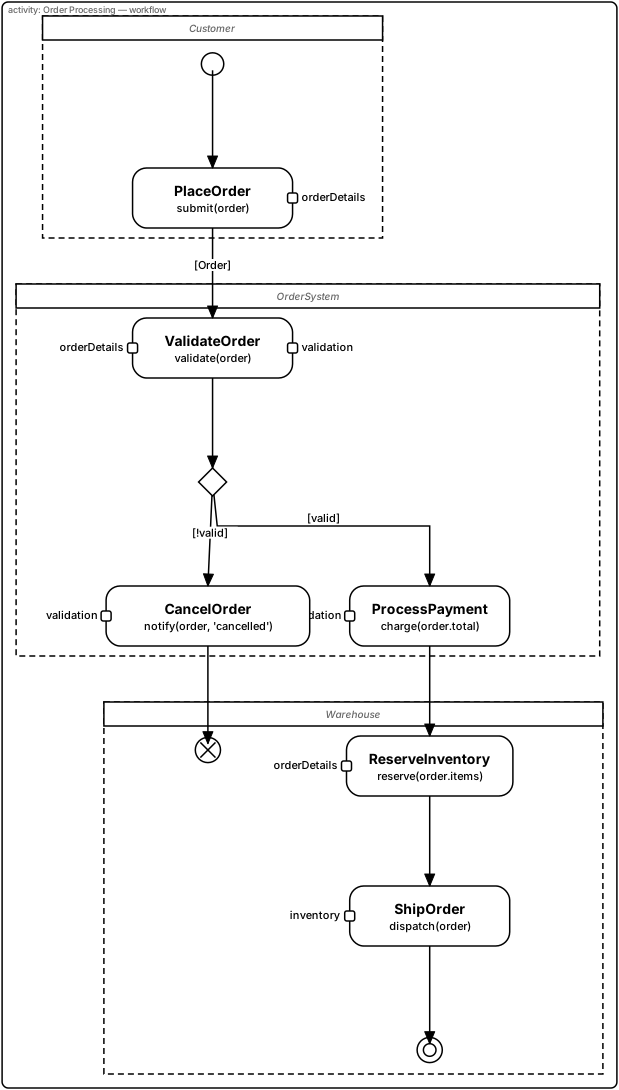
Rendered live below (vault source:
03 Bereiche/kUML/Beispiele/07 SysML 2 ACT – Order Processing.md) — swimlanes
(partitions), typed pins, a decision node, and an object flow carrying a typed order:
import dev.kuml.sysml2.ActionPin
import dev.kuml.sysml2.PinDirection
import dev.kuml.sysml2.dsl.sysml2Model

sysml2Model(name = "OrderProcessing") {
    partDef(name = "Customer")
    partDef(name = "OrderSystem")
    partDef(name = "Warehouse")

    val customerLane = activityPartition(name = "Customer", represents = "Customer")
    val orderSysLane = activityPartition(name = "OrderSystem", represents = "OrderSystem")
    val warehouseLane = activityPartition(name = "Warehouse", represents = "Warehouse")

    val initial = initialNode(partition = customerLane)
    val placeOrder = actionDef(
        name = "PlaceOrder",
        action = "submit(order)",
        partition = customerLane,
        pins = listOf(ActionPin(name = "orderDetails", typeId = "Order", direction = PinDirection.Output)),
    )

    val validate = actionDef(
        name = "ValidateOrder",
        action = "validate(order)",
        partition = orderSysLane,
        pins = listOf(
            ActionPin(name = "orderDetails", typeId = "Order", direction = PinDirection.Input),
            ActionPin(name = "validation", typeId = "Bool", direction = PinDirection.Output),
        ),
    )
    val decide = decisionNode(name = "valid?", partition = orderSysLane)
    val pay = actionDef(
        name = "ProcessPayment",
        action = "charge(order.total)",
        partition = orderSysLane,
        pins = listOf(ActionPin(name = "validation", typeId = "Bool", direction = PinDirection.Input)),
    )
    val cancel = actionDef(
        name = "CancelOrder",
        action = "notify(order, 'cancelled')",
        partition = orderSysLane,
        pins = listOf(ActionPin(name = "validation", typeId = "Bool", direction = PinDirection.Input)),
    )

    val reserve = actionDef(
        name = "ReserveInventory",
        action = "reserve(order.items)",
        partition = warehouseLane,
        pins = listOf(ActionPin(name = "orderDetails", typeId = "Order", direction = PinDirection.Input)),
    )
    val ship = actionDef(
        name = "ShipOrder",
        action = "dispatch(order)",
        partition = warehouseLane,
        pins = listOf(ActionPin(name = "inventory", typeId = "Inventory", direction = PinDirection.Input)),
    )
    val finalN = finalNode(partition = warehouseLane)
    val flowFinal = flowFinalNode(partition = warehouseLane)

    controlFlow(name = "start", source = initial, target = placeOrder)
    controlFlow(name = "validated", source = validate, target = decide)
    controlFlow(name = "yes", source = decide, target = pay, guard = "valid")
    controlFlow(name = "payToReserve", source = pay, target = reserve)
    controlFlow(name = "reserveToShip", source = reserve, target = ship)
    controlFlow(name = "end", source = ship, target = finalN)
    controlFlow(name = "no", source = decide, target = cancel, guard = "!valid")
    controlFlow(name = "cancelEnd", source = cancel, target = flowFinal)

    objectFlow(name = "carryOrder", source = placeOrder, target = validate, objectType = "Order")

    actDiagram(name = "Order Processing — workflow") {
        include(node = initial)
        include(node = placeOrder)
        include(node = validate)
        include(node = decide)
        include(node = pay)
        include(node = cancel)
        include(node = reserve)
        include(node = ship)
        include(node = finalN)
        include(node = flowFinal)
    }
}
Activity diagrams are also runnable via kuml simulate. The trace contains ForkSplit,
JoinReached, ActionExecuted, and ActivityTerminated entries.
kuml simulate currently supports STM and ACT diagram types for SysML 2 models.
Other diagram types (BDD, IBD, REQ, SEQ, PAR) produce renderable output only.
|
Signals, regions, exceptions and pins
Besides plain actions, activity diagrams offer signal and event nodes, interruptible regions, exception handlers and pins on any side of an action.
| DSL | Shape |
|---|---|
|
pentagon with the tip on the right |
|
rectangle with a notch on the left |
|
hourglass with the time label below |
|
action with a rake symbol; the SVG group carries |
|
dashed rounded frame around the nodes created with |
|
lightning-bolt edge labelled with the type |
|
lightning-bolt edge with an open arrow |
|
pin square on the chosen side |
sysml2Model("Payment") {
    val payment = interruptibleRegion(name = "Payment")
    val ask = sendSignal(name = "RequestPayment", signal = "PaymentRequest", region = payment)
    val timeout = acceptTimeEvent(name = "Timeout", time = "after 10 min", region = payment)
    val cancel = actionDef(name = "CancelOrder")
    val charge = actionDef(name = "ChargeCard", pins = listOf(
        ActionPin(name = "order", direction = PinDirection.Input, side = PinSide.Top)))
    val handler = actionDef(name = "HandleError")
    controlFlow(name = "timedOut", source = timeout, target = cancel, interrupts = true)
    exceptionHandler(protectedNode = charge, handler = handler, type = "PaymentError")
    actDiagram("Payment") { include(ask); include(timeout); include(cancel); include(charge); include(handler) }
}
Pins: PinSide.Auto keeps input pins on the left and output pins on the right. An explicit side
enlarges the action box by 18 px per pin on that side. Object flows with sourcePin / targetPin
end at the pin squares.
Structural checks (kuml validate, ACT)
kuml validate reports activity findings as ACT301 to ACT315: missing signal or time expression (301/302),
overlong text (303), region cycles or nesting deeper than 4 (304), handler on itself or on a non-action (305/306),
wrong or missing pins (307), more than 8 pins per side (308), more than 8 handlers per node (309), dangling references
(310), unresolved calledActivityId (311), interrupting flow that does not leave a region (312), pins on pseudo
nodes (313), showName on non-control nodes (314) and a region spanning several partitions (315).
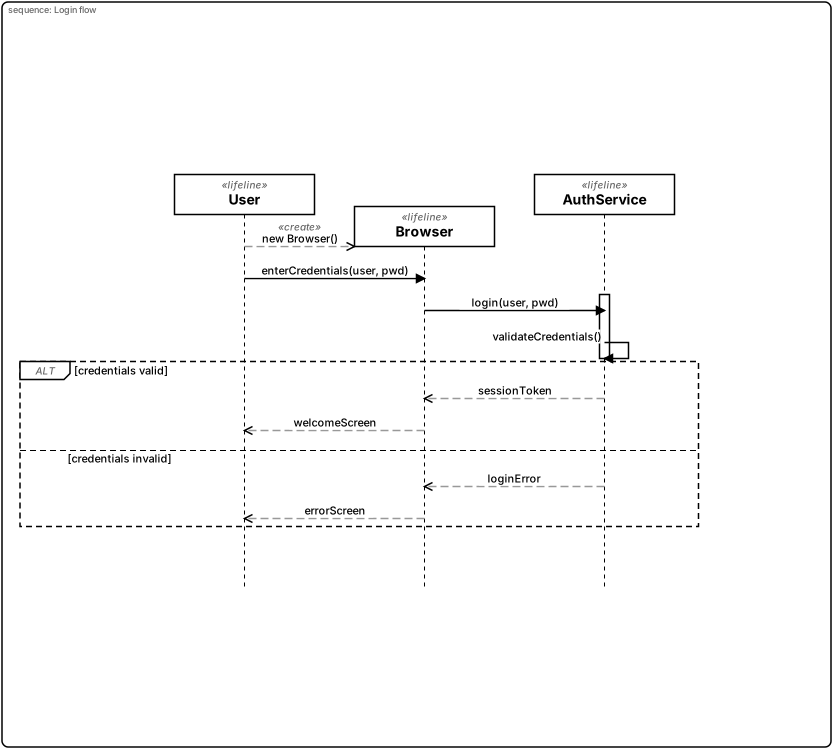
Sequence Diagrams (SEQ)
Time-ordered interaction between blocks: lifelines, messages, execution
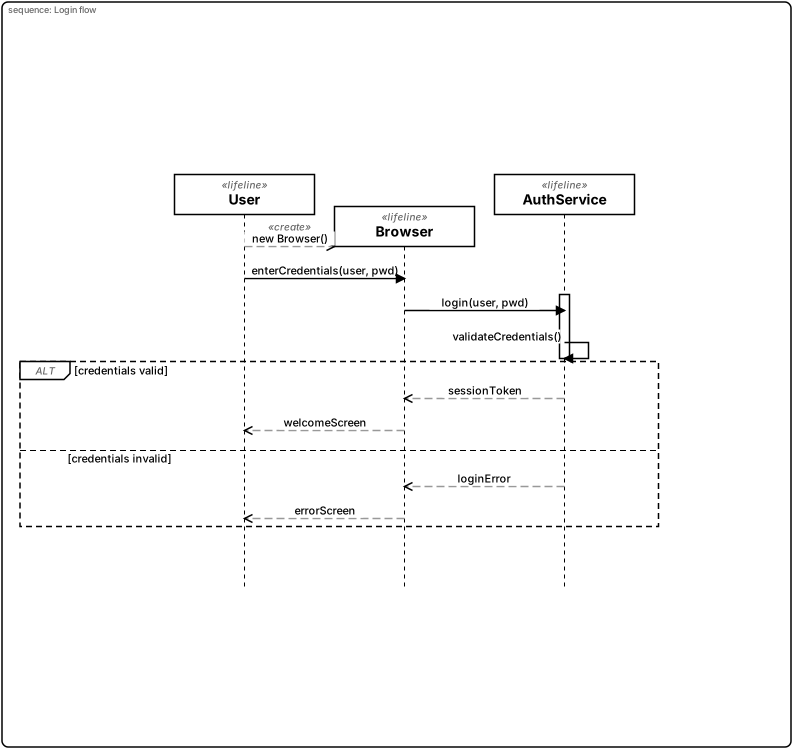
specifications, and combined fragments (alt, loop, …). Rendered live below
(vault source: 03 Bereiche/kUML/Beispiele/06 SysML 2 SEQ – Login Flow.md):
import dev.kuml.sysml2.CombinedFragmentOperand
import dev.kuml.sysml2.CombinedFragmentOperator
import dev.kuml.sysml2.MessageKind
import dev.kuml.sysml2.dsl.sysml2Model

sysml2Model(name = "LoginFlow") {
    val user = lifelineDef(name = "User")
    val browser = lifelineDef(name = "Browser")
    val authService = lifelineDef(name = "AuthService")

    message(label = "new Browser()", source = user, target = browser, seqNo = 0, kind = MessageKind.Create)
    message(label = "enterCredentials(user, pwd)", source = user, target = browser, seqNo = 1, kind = MessageKind.Sync)
    message(label = "login(user, pwd)", source = browser, target = authService, seqNo = 2, kind = MessageKind.Sync)
    message(label = "validateCredentials()", source = authService, target = authService, seqNo = 3, kind = MessageKind.Sync)
    message(label = "sessionToken", source = authService, target = browser, seqNo = 4, kind = MessageKind.Reply)
    message(label = "welcomeScreen", source = browser, target = user, seqNo = 5, kind = MessageKind.Reply)
    message(label = "loginError", source = authService, target = browser, seqNo = 6, kind = MessageKind.Reply)
    message(label = "errorScreen", source = browser, target = user, seqNo = 7, kind = MessageKind.Reply)

    executionSpec(name = "authServiceActive", lifeline = authService, startSeqNo = 2, endSeqNo = 3)

    combinedFragment(
        name = "credentialsCheck",
        operator = CombinedFragmentOperator.Alt,
        operands = listOf(
            CombinedFragmentOperand(guard = "credentials valid", startSeqNo = 4, endSeqNo = 5),
            CombinedFragmentOperand(guard = "credentials invalid", startSeqNo = 6, endSeqNo = 7),
        ),
    )

    seqDiagram(name = "Login flow") {
        include(lifeline = user)
        include(lifeline = browser)
        include(lifeline = authService)
    }
}
Nested fragments, ref, time constraints, found and lost messages
Combined fragments can be nested with the block form; every nested fragment is registered with
its parent operand. Fragments nested deeper than 8 levels (or with unknown or cyclic parents) are
rendered flat, never rejected by the renderer; kuml validate reports them.
combinedFragment("retry", CombinedFragmentOperator.Loop) {
    operand(guard = "attempts < 3", start = 1, end = 5) {
        combinedFragment("cache", CombinedFragmentOperator.Alt) {
            operand(guard = "hit", start = 1, end = 2)
            operand(guard = "miss", start = 3, end = 4)
        }
    }
}
interactionUse(name = "auth", refersTo = "Authenticate", lifelines = listOf(user, browser), seqNo = 8)
durationConstraint(lifeline = user, from = 0, to = 2, expression = "0..3s")
timeObservation(lifeline = browser, seqNo = 0, name = "t0")
foundMessage(label = "ping", target = browser, seqNo = 9)
lostMessage(label = "drop", source = browser, seqNo = 10)-
A nested frame is inset by 10 px per level on both sides and starts one header band below its parent.
-
interactionUse(ref) draws a 48 px high frame from the leftmost to the rightmost covered lifeline (+16 px); the referenced name is plain text, never a link. Following rows move down by 16 px. -
durationConstraintdraws a bracket 14 px right of the lifeline axis (of the activation bar if present);timeObservationdraws a tick labelledname = now. Lifeline spacing grows so the texts do not run into the neighbouring lifeline. -
Found and lost messages are 80 px long with a filled 5 px circle; the lifeline order of a diagram is always the declaration order.
-
The
«destroy»label keeps clear of the 16 px X marker.
Not supported in this version: interaction gates, nested fragments and the new constructs in the LaTeX output (the LaTeX SEQ renderer keeps its rectangle fallback and draws no fragments at all).
Structural checks (kuml validate, SEQ)
| Code | Severity | Rule |
|---|---|---|
|
Error |
nested fragment’s rows are outside the parent operand (or the operand index is missing) |
|
Error |
unknown parent, self reference or cycle |
|
Error |
nesting deeper than 8 |
|
Error |
more than 256 fragments |
|
Error |
more than 16 operands in one fragment |
|
Error |
|
|
Warning |
|
|
Warning |
text longer than 200 (time expressions: 64) characters |
|
Error |
found/lost message with different source and target lifeline |
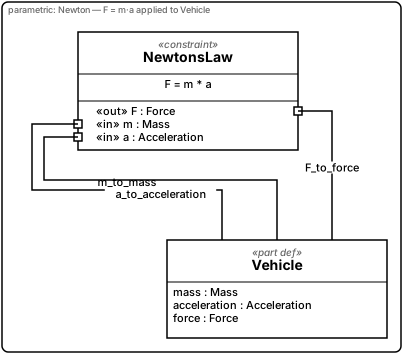
Parametric Diagrams (PAR)
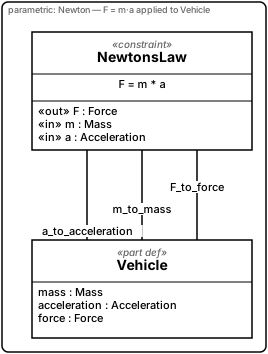
Parametric diagrams connect constraint properties to value properties, expressing numerical relationships.
Rendered live below (vault source:
03 Bereiche/kUML/Beispiele/28 SysML 2 PAR – Newton.md):
import dev.kuml.sysml2.ConstraintParameter
import dev.kuml.sysml2.ConstraintParameterDirection
import dev.kuml.sysml2.dsl.sysml2Model

sysml2Model(name = "NewtonModel") {
    attributeDef(name = "Mass")
    attributeDef(name = "Acceleration")
    attributeDef(name = "Force")

    val newton = constraintDef(
        name = "NewtonsLaw",
        expression = "F = m * a",
        parameters = listOf(
            ConstraintParameter(name = "F", typeId = "Force",        direction = ConstraintParameterDirection.Out),
            ConstraintParameter(name = "m", typeId = "Mass",         direction = ConstraintParameterDirection.In),
            ConstraintParameter(name = "a", typeId = "Acceleration", direction = ConstraintParameterDirection.In),
        ),
    )

    val vehicle = partDef(name = "Vehicle") {
        attribute(name = "mass",         typeId = "Mass")
        attribute(name = "acceleration", typeId = "Acceleration")
        attribute(name = "force",        typeId = "Force")
    }

    bind(name = "F_to_force",         source = "NewtonsLaw::F", target = "Vehicle::force")
    bind(name = "m_to_mass",          source = "NewtonsLaw::m", target = "Vehicle::mass")
    bind(name = "a_to_acceleration",  source = "NewtonsLaw::a", target = "Vehicle::acceleration")

    parDiagram(name = "Newton — F = m·a applied to Vehicle") {
        include(definition = newton)
        include(definition = vehicle)
    }
}
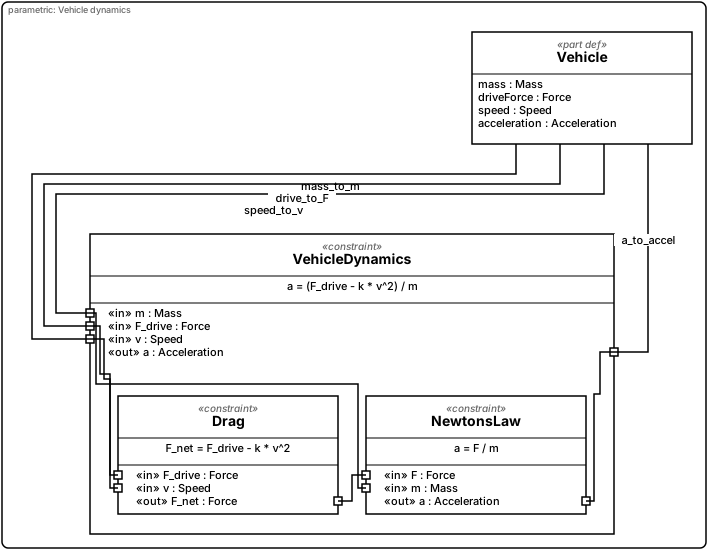
Nested constraints and pins
Every constraint parameter is drawn as a small square pin on the box frame: in parameters on the
left, out and inout on the right, at the height of the parameter’s row. A binding whose endpoint is
"<constraint>::<parameter>" ends at that pin. The helper constraint.pin("name") builds the endpoint id
and fails while the model is built if the constraint has no such parameter. An endpoint that names a
constraint but no existing parameter ends at the box centre and kuml validate warns (PAR441).
A constraint can be nested in another one with parent = outer. The inner box is drawn inside the outer
box; bindings between the outer pins and the inner pins, and between inner constraints, run inside the outer
box and carry no label. Two levels are recommended; the hard limit is four levels (the outer constraint counts
as level one) and 64 parameters per constraint.
Rendered live below (vault source: 03 Bereiche/kUML/Beispiele/51 SysML 2 PAR – Verschachtelte Constraints.md):
import dev.kuml.sysml2.ConstraintParameter
import dev.kuml.sysml2.ConstraintParameterDirection.In
import dev.kuml.sysml2.ConstraintParameterDirection.Out
import dev.kuml.sysml2.dsl.sysml2Model

sysml2Model(name = "VehicleDynamicsModel") {
    attributeDef(name = "Mass")
    attributeDef(name = "Force")
    attributeDef(name = "Speed")
    attributeDef(name = "Acceleration")

    val dynamics = constraintDef(
        name = "VehicleDynamics",
        expression = "a = (F_drive - k * v^2) / m",
        parameters = listOf(
            ConstraintParameter(name = "m", typeId = "Mass", direction = In),
            ConstraintParameter(name = "F_drive", typeId = "Force", direction = In),
            ConstraintParameter(name = "v", typeId = "Speed", direction = In),
            ConstraintParameter(name = "a", typeId = "Acceleration", direction = Out),
        ),
    )
    val drag = constraintDef(
        name = "Drag",
        expression = "F_net = F_drive - k * v^2",
        parameters = listOf(
            ConstraintParameter(name = "F_drive", typeId = "Force", direction = In),
            ConstraintParameter(name = "v", typeId = "Speed", direction = In),
            ConstraintParameter(name = "F_net", typeId = "Force", direction = Out),
        ),
        parent = dynamics,
    )
    val newton = constraintDef(
        name = "NewtonsLaw",
        expression = "a = F / m",
        parameters = listOf(
            ConstraintParameter(name = "F", typeId = "Force", direction = In),
            ConstraintParameter(name = "m", typeId = "Mass", direction = In),
            ConstraintParameter(name = "a", typeId = "Acceleration", direction = Out),
        ),
        parent = dynamics,
    )
    val vehicle = partDef(name = "Vehicle") {
        attribute(name = "mass", typeId = "Mass")
        attribute(name = "driveForce", typeId = "Force")
        attribute(name = "speed", typeId = "Speed")
        attribute(name = "acceleration", typeId = "Acceleration")
    }

    // Vehicle attributes to the pins of the outer constraint
    bind(name = "mass_to_m", source = "Vehicle::mass", target = dynamics.pin("m"))
    bind(name = "drive_to_F", source = "Vehicle::driveForce", target = dynamics.pin("F_drive"))
    bind(name = "speed_to_v", source = "Vehicle::speed", target = dynamics.pin("v"))
    bind(name = "a_to_accel", source = dynamics.pin("a"), target = "Vehicle::acceleration")
    // Outer pins to inner pins
    bind(name = "F_to_drag", source = dynamics.pin("F_drive"), target = drag.pin("F_drive"))
    bind(name = "v_to_drag", source = dynamics.pin("v"), target = drag.pin("v"))
    bind(name = "m_to_newton", source = dynamics.pin("m"), target = newton.pin("m"))
    // Between the inner constraints
    bind(name = "net_to_newton", source = drag.pin("F_net"), target = newton.pin("F"))
    // Inner pin back to the outer pin
    bind(name = "newton_to_a", source = newton.pin("a"), target = dynamics.pin("a"))

    parDiagram(name = "Vehicle dynamics") {
        include(definition = dynamics)
        include(definition = drag)
        include(definition = newton)
        include(definition = vehicle)
    }
}
| Code | Severity | Rule |
|---|---|---|
|
Error |
nesting deeper than four levels |
|
Error |
ownership cycle |
|
Error |
|
|
Error |
more than 64 parameters on one constraint |
|
Warning |
binding endpoint does not name a parameter of its constraint |
Known limits: a binding that crosses more than one nesting level (outer pin to a grandchild pin) is drawn as a straight line between the two pins, and the LaTeX renderer still draws constraint boxes without pins.
Notes
SysML 2 models carry free-text comments. Use comment(…) (alias note(…)) either on the model or
inside a diagram block:
sysml2Model(name = "Vehicle") {
    val vehicle = partDef(name = "Vehicle")
    val engine = partDef(name = "Engine")

    // model level: shown in every diagram in which one of its anchors is visible
    comment(text = "Engine and vehicle are developed by different teams.", vehicle, engine)

    bdd(name = "Overview") {
        include(definition = vehicle)
        include(definition = engine)
        // diagram level: stored in the model and listed in this diagram
        comment(text = "Free-standing note", id = "legend")
    }
}-
Anchors are element ids (
comment(text = "…", "Vehicle", "Engine")) or element handles (comment(text = "…", firstAnchor = vehicle)). Without anchors the note is free-standing. -
A comment appears in a diagram if its id is listed in the diagram’s
noteIds(via a comment inside the diagram block,include(comment)orincludeCommentById(id)), or if at least one anchor is visible there. Links to invisible targets are not drawn. Note ids never go intoelementIds, because an emptyelementIdsmeans "show everything" for some diagram kinds. -
Notes are laid out with the diagram (BDD, IBD, UC, REQ, STM, ACT, PAR). In a sequence diagram they are placed after the layout in a column right of the rightmost lifeline.
-
Anchor limits: ports (IBD) and activity partitions (ACT) cannot be anchored; anchor the part usage or the action instead.
-
Body limit: 65 536 characters (hard), display limit 2000 characters / 30 lines.
-
kuml validatereportsSYSML2_NOTE_ANCHOR_UNKNOWN,SYSML2_NOTE_DUPLICATE_ID(errors) andSYSML2_NOTE_NOT_SHOWN(warning: an unanchored comment is listed in no diagram).
| The LaTeX/TikZ export does not draw notes yet. |
M2M transforms from UML to SysML 2
kuml transform supports model-to-model (M2M) transformations. As of V2.x, UML models
can be used as a source for SysML 2 transformer targets:
kuml transform uml-order-domain.kuml.kts \
    --transformer uml-to-sysml2-requirements \
    --output sysml2-req-view.kuml.kts
List all available transformers:
kuml transform --list-transformers
The SysML 2 transformer targets were introduced in V2.x. Earlier CLI versions only
supported code generation via kuml generate. See CLI Reference for the
full transform subcommand documentation.
|
Cross-references
-
State-Machine Simulation — events format, trace format, golden traces, interactive REPL
-
CLI Reference —
kuml simulate,kuml transform,kuml rendersubcommands -
UML DSL Reference — the parallel UML 2.x language
Ports, flows and allocations
portDef("FuelPort") { flowProperty("fuel", "Fuel", PortDirection.In) }
partDef("Engine") { port("injector", "FuelPort", direction = PortDirection.In, conjugated = true) }
partDef("Vehicle") {
    port("fuelIn", "FuelPort", direction = PortDirection.In)
    part("engine", "Engine")
    refPart("tank", "Tank")
    connect("feed", "FuelLine", "tank.outlet", "engine.injector")
    flow("Fuel", "tank.outlet", "engine.injector", via = "feed")
}
allocate("Controller", "Vehicle")
Dotted paths exist only in the DSL; the model stores Owner::part::port. A conjugated port inverts
in and out of its flow properties (effectiveDirection); the drawn triangle shows the declared
direction, the conjugation is visible as ~Type in the label.
IBD frame
An IBD draws an owner frame with boundary ports only when a connection, flow or binding ends on a port of the owner, or reaches deeper than one path step below a visible part. Otherwise it renders without a frame. Only one nesting level is drawn.
BDD relationships
Compositions (filled diamond), aggregations (refPart, hollow diamond), associations (a connection
definition with two block-typed parts, not itself shown) and allocations are drawn as edges when both
ends are visible; the matching rows leave the feature compartment. Blocks show actions and
flows compartments (<dir> <name> : <Type> per flow property of their ports) when non-empty; attribute definitions with a unit show unit = <symbol>.