UML DSL Reference
kUML supports all 13 UML 2.x diagram types defined by OMG. Every type uses the same
authoring pattern: a top-level diagram builder, optionally wrapped in a umlModel { … }
container.
Diagram types at a glance
| Type | Builder | Use it for |
|---|---|---|
Class |
|
Static structure: classes, interfaces, enums, generalisation, association. |
Object |
|
Concrete snapshots: instances and links between them at a point in time. |
Package |
|
Logical grouping: packages, nested packages, package dependencies. |
Component |
|
Software architecture: components, ports, provided/required interfaces. |
Deployment |
|
Physical mapping: nodes, artifacts, deployment relationships. |
Use case |
|
Actor goals: actors, use cases, include/extend relationships. |
Sequence |
|
Time-ordered interaction: lifelines, messages, fragments. |
Communication |
|
Spatially-ordered interaction: lifelines connected by numbered messages. |
State machine |
|
Discrete behaviour: states, transitions, triggers, guards, effects. |
Activity |
|
Workflow: actions, control flow, decisions, parallel splits. |
Profile |
|
Stereotype definitions: extensions of the UML metamodel. |
Timing |
|
State-over-time: lifelines with state changes along a timeline. |
Interaction overview |
|
Control flow over interactions: combines activity + sequence semantics. |
Composite structure |
|
Internal structure: parts, ports, connectors within a classifier. |
Class diagrams
The most common starting point. All classifier-level constructs go inside classDiagram { … }.
classDiagram(name = "Domain") {
    // Enumerations
    val status = enumOf(name = "OrderStatus") {
        literal(name = "DRAFT")
        literal(name = "CONFIRMED")
    }

    // Interfaces
    val payable = interfaceOf(name = "Payable") {
        operation(name = "amountDue") { returnType = "BigDecimal" }
    }

    // Classes
    val order = classOf(name = "Order") {
        // Attributes
        attribute(name = "id", type = "UUID") { visibility = Visibility.Private }
        attribute(name = "status", type = status)         // enum val as type
        attribute(name = "total", type = "BigDecimal")

        // Operations
        operation(name = "confirm")
        operation(name = "cancel") {
            visibility = Visibility.Public
            returnType = "Boolean"
        }

        // OCL invariants
        constraint(name = "PositiveTotal", body = "self.total >= 0")
    }

    val customer = classOf(name = "Customer")

    // Relationships
    generalization(child = order, parent = "AbstractEntity")
    realization(client = order, supplier = payable)
    association(source = order, target = customer) {
        sourceMultiplicity = "*"
        targetMultiplicity = "1"
        targetRole = "customer"
    }
}
Classifier features in detail
| Element | Notes |
|---|---|
|
|
|
Block-form: add |
|
Inside an |
|
Applies an applied-stereotype to the surrounding element. Requires a matching profile
to be |
|
Cosmetic display-label stereotype ( |
|
Adds an OCL invariant. Evaluated by |
|
Aggregation kind on an |
Association classes
UML 2.5 (§11.5.3) defines the association class — a modelling element with a genuine
double nature: it is simultaneously a classifier (owns attributes, operations,
constraints, and can take part in generalisation/realisation like classOf) and a
relationship (connects exactly two classifiers, like association). kUML models this as
one thing with one name and one ID — associationClass(…) — rather than a plain
class paired with a separate association.
classDiagram(name = "Elections") {
    val party = classOf(name = "Party")
    val district = classOf(name = "District")

    val tally = associationClass(name = "Tally", source = party, target = district) {
        attribute(name = "votes", type = "Int")
        source { multiplicity(spec = "1") }
        target { multiplicity(spec = "0..*") }
    }
}
Three overloads resolve the two ends the same way association(…) does:
| Overload | When to use it |
|---|---|
|
Both ends already have a builder |
|
Referencing a classifier declared elsewhere by ID (e.g. across a larger script, or when reconstructing a diagram programmatically). |
|
Lowest-level form the other two delegate to; rarely called directly. |
Inside the block, an association class exposes the full classifier surface
(attribute, operation, constraint, extends, implements, stereotypes,
layout { }) plus the two association ends (source { } / target { }, each
accepting multiplicity(…), role, and navigable) and aggregation =
AggregationKind.{NONE,SHARED,COMPOSITE} — everything a plain association(…) or
classOf(…) supports individually.
Rendering draws the classifier as a normal class box, the association line between its
two ends exactly like association(…) (navigability arrowheads, aggregation
diamonds, role/multiplicity labels included), and a dashed tether line connecting the
box to the association line’s midpoint — the visual cue that both belong to the same
element. Self-association classes (both ends on the same classifier) get the same
widened C-loop routing as a self-association. kuml validate flags an end referencing
an unknown classifier ID as a DANGLING_REFERENCE warning, same as a plain association.
Current scope: ends always has exactly two entries — the DSL exposes no way to
construct an n-ary association class. UmlMetaclass.AssociationClass does not exist yet
(profile/stereotype validation treats an association class as UmlMetaclass.Class);
codegen (Java/Kotlin/TypeScript/C#/C++/Exposed, JPA-M2M, UML→ERM), the Kuiver
(Compose) renderer, EMF/UML2 export, OCL navigation, MCP list/describe tools, and
LaTeX compartment rendering do not yet have dedicated association-class handling.
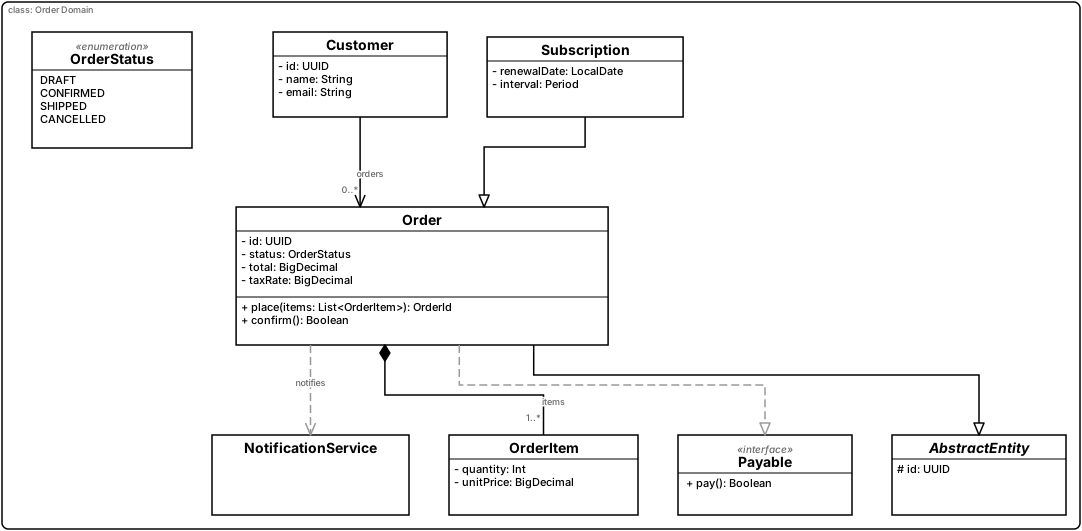
Worked example — Order Domain
A larger, fully working class diagram exercising enums, interfaces, abstract
classes, static/read-only/default-valued attributes, operations with
parameters, an OCL invariant, interface realisation, generalisation, a
non-navigable association end, a composite association, and a dependency.
Rendered live below (vault source:
03 Bereiche/kUML/Beispiele/01 UML Klasse – Order Domain.md):
classDiagram(name = "Order Domain") {
    val status = enumOf(name = "OrderStatus") {
        literal(name = "DRAFT")
        literal(name = "CONFIRMED")
        literal(name = "SHIPPED")
        literal(name = "CANCELLED")
    }

    val payable = interfaceOf(name = "Payable") {
        operation(name = "pay") { returns(typeName = "Boolean") }
    }

    // Abstract base class — name is rendered in italics
    val abstractEntity = classOf(name = "AbstractEntity") {
        isAbstract = true
        attribute(name = "id", type = "UUID", visibility = Visibility.PROTECTED, isReadOnly = true)
    }

    val customer = classOf(name = "Customer") {
        attribute(name = "id",    type = "UUID")
        attribute(name = "name",  type = "String")
        attribute(name = "email", type = "String")
    }

    val order = classOf(name = "Order") {
        attribute(name = "id",     type = "UUID")
        attribute(name = "status", type = status, defaultValue = "DRAFT")
        attribute(name = "total",  type = "BigDecimal", visibility = Visibility.PRIVATE)
        attribute(name = "taxRate", type = "BigDecimal", isStatic = true, defaultValue = "0.19")
        implements(iface = payable)
        extends(general = abstractEntity)

        operation(name = "place") {
            visibility = Visibility.PUBLIC
            parameter(name = "items", type = "List<OrderItem>")
            returns(typeName = "OrderId")
        }
        operation(name = "confirm") { returns(typeName = "Boolean") }

        // OCL invariant — checked by `kuml validate`
        constraint(name = "PositiveTotal", body = "self.total >= 0")
    }

    val orderItem = classOf(name = "OrderItem") {
        attribute(name = "quantity",  type = "Int")
        attribute(name = "unitPrice", type = "BigDecimal")
    }

    val subscription = classOf(name = "Subscription") {
        attribute(name = "renewalDate", type = "LocalDate")
        attribute(name = "interval",    type = "Period")
    }

    // Generalisation: Subscription inherits from Order (top-level form)
    generalization(specific = subscription, general = order)

    // Dependency: Order uses a notification class without owning it
    val notification = classOf(name = "NotificationService")
    dependency(client = order, supplier = notification, name = "notifies")

    // Association: a customer owns 0..n orders; Order does not know its customer (non-navigable)
    association(source = customer, target = order) {
        source { multiplicity(spec = "1"); navigable = false }
        target { multiplicity(spec = "0..*"); role = "orders" }
    }

    // Composition: an order consists of 1..n order items
    association(source = order, target = orderItem) {
        aggregation = AggregationKind.COMPOSITE
        source { multiplicity(spec = "1") }
        target { multiplicity(spec = "1..*"); role = "items" }
    }
}
Comments
A UML comment (note) is a free-text annotation box with a folded top-right corner,
optionally attached to zero or more model elements by a dashed line. Use comment(…)
inside a diagram body:
classDiagram(name = "Order Domain") {
    val order = classOf(name = "Order") { /* ... */ }

    // Anchored to one element (the anchor's builder handle)
    comment(
        text = "Encapsulates the full order lifecycle from placement to fulfillment.",
        firstAnchor = order,
    )

    // Anchored to several elements, or by raw ID instead of a handle
    // comment(text = "...", firstAnchor = order, moreAnchors = arrayOf(subscription))
    // comment(text = "...", anchors = arrayOf("Order", "Subscription"))

    // Free-standing note (no anchors)
    // comment(text = "TODO: model refunds")
}
comment(…) is available on class, sequence (UmlInteractionScope), and
state-machine (UmlStateMachineScope) diagram bodies as of v0.23.1. Other diagram
types (object, package, component, deployment, use case, activity, BPMN, SysML 2,
C4, …) do not have a comment() DSL function yet — this is a known, intentional
scope limitation, not an oversight.
|
Object diagrams
Object diagrams show concrete instances. Use them for examples and snapshots.
objectDiagram(name = "Order #42") {
    val order = objectOf(name = "order42", classifier = "Order") {
        slot(name = "status", value = "CONFIRMED")
        slot(name = "total", value = "99.50")
    }
    val item1 = objectOf(name = "item1", classifier = "OrderItem")
    val item2 = objectOf(name = "item2", classifier = "OrderItem")
    link(source = order, target = item1)
    link(source = order, target = item2)
}
Component diagrams
Component diagrams describe software architecture: which components exist, what they provide, what they require.
componentDiagram(name = "Order service architecture") {
    val orderService = component(name = "OrderService") {
        port(name = "rest")
        operation(name = "placeOrder")
        attribute(name = "config", type = "OrderConfig")
    }

    val paymentService = component(name = "PaymentService") {
        port(name = "rest")
    }

    dependency(source = orderService, target = paymentService) {
        // technology = "REST"   (V1.2)
    }
}
Components can carry attributes and operations as of v0.3.0 — they are full classifiers.
State machines
State machines have their own scope inside a stateDiagram { … }.
stateDiagram(name = "Order lifecycle") {
    stateMachine(name = "Order") {
        initial(name = "start")
        state(name = "draft")
        state(name = "confirmed")
        state(name = "shipped") { final() }

        // Composite state with substates
        state(name = "processing") {
            initial(name = "picking")
            state(name = "picking")
            state(name = "packing")
            transition(from = "picking", to = "packing", trigger = "packed")
        }

        // Transitions: trigger, guard, effect
        transition(from = "start", to = "draft")
        transition(from = "draft", to = "confirmed", trigger = "confirm",
                   guard = "self.total > 0", effect = "log('confirmed')")
        transition(from = "confirmed", to = "shipped", trigger = "ship")
        transition(from = "confirmed", to = "processing", trigger = "process")
        transition(from = "processing", to = "shipped", trigger = "complete")
    }
}
Triggers, guards, and effects are free-form strings. The runtime parses guards as OCL and evaluates them against the current state; effects are recorded in the trace but not executed in v0.3.0 (effect execution is V2). Triggers match by exact string equality.
See state-machine simulation for the operational semantics and how to run a machine against a stream of events.
Sequence diagrams
sequenceDiagram(name = "Place order flow") {
    val customer = lifeline(name = "Customer", classifier = "Customer")
    val service = lifeline(name = "OrderService", classifier = "OrderService")
    val payment = lifeline(name = "PaymentService", classifier = "PaymentService")

    message(from = customer, to = service, label = "placeOrder()")
    message(from = service, to = payment, label = "authorise()")
    message(from = payment, to = service, label = "OK", style = MessageStyle.Reply)
    message(from = service, to = customer, label = "confirmation", style = MessageStyle.Reply)
}
Use case diagrams
useCaseDiagram(name = "Customer goals") {
    val customer = actor(name = "Customer")
    val staff = actor(name = "Staff")

    val placeOrder = useCase(name = "Place order")
    val payOrder = useCase(name = "Pay order")
    val refundOrder = useCase(name = "Refund order")

    customer.uses(placeOrder)
    customer.uses(payOrder)
    staff.uses(refundOrder)

    placeOrder.includes(payOrder)
    refundOrder.extends(payOrder)
}
Package diagrams
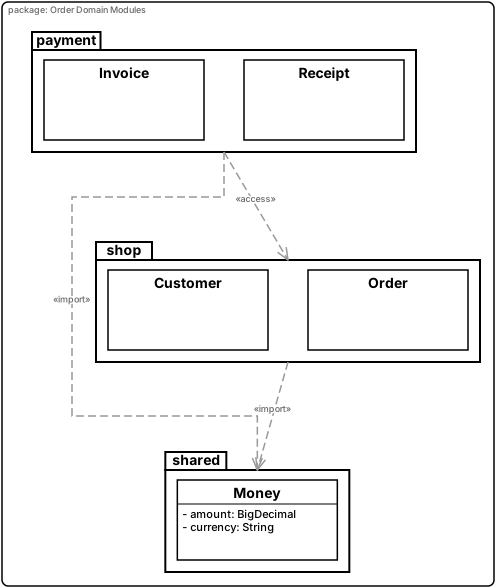
Package diagrams organise classifiers into logical modules and show import/access dependencies between packages.
packageDiagram(name = "Order Domain Modules") {
    val shared = packageOf(name = "shared") {
        classOf(name = "Money") {
            attribute(name = "amount", type = "BigDecimal")
            attribute(name = "currency", type = "String")
        }
    }

    val shop = packageOf(name = "shop") {
        classOf(name = "Customer")
        classOf(name = "Order")
    }

    val payment = packageOf(name = "payment") {
        classOf(name = "Invoice")
        classOf(name = "Receipt")
    }

    packageImport(client = shop, supplier = shared)
    packageImport(client = payment, supplier = shared)
    packageAccess(client = payment, supplier = shop)
}
Deployment diagrams
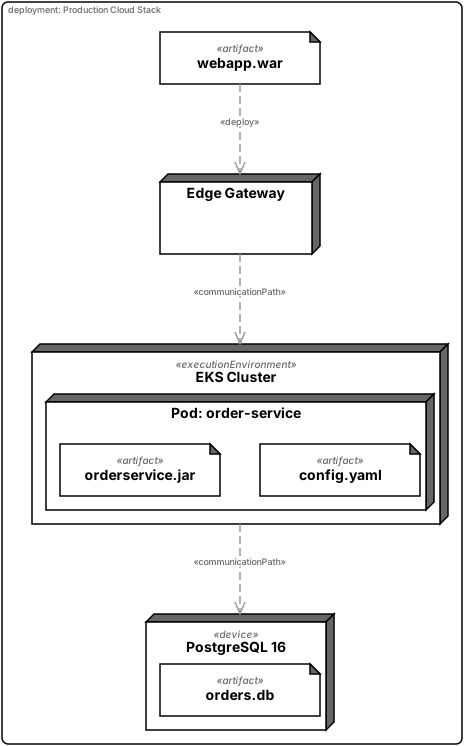
Deployment diagrams show the physical mapping of software artifacts to execution nodes
and devices. Nested executionEnvironment { }, node { }, and device { } scopes
model the hardware/container hierarchy; artifact places software inside a node;
communicationPath connects two nodes.
deploymentDiagram(name = "Production Cloud Stack") {
    val cluster = executionEnvironment(name = "EKS Cluster") {
        node(name = "Pod: order-service") {
            artifact(name = "orderservice.jar")
            artifact(name = "config.yaml")
        }
    }

    val db = device(name = "PostgreSQL 16") {
        artifact(name = "orders.db")
    }

    val webApp = artifact(name = "webapp.war")
    val edge = node(name = "Edge Gateway")
    deploy(artifact = webApp, node = edge)

    communicationPath(end1 = cluster, end2 = db)
    communicationPath(end1 = edge, end2 = cluster)
}
Activity diagrams
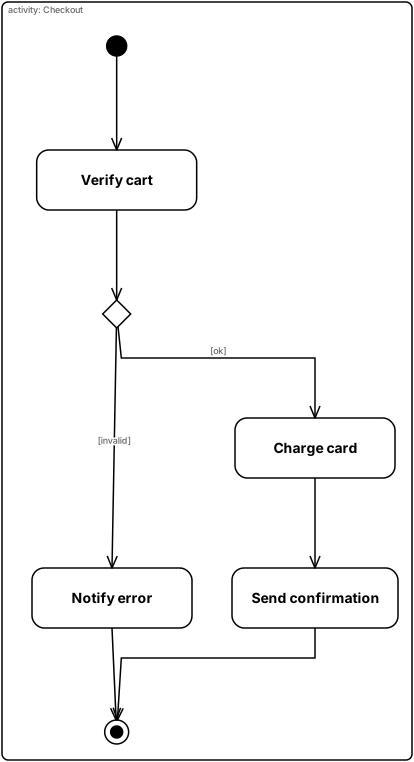
Activity diagrams describe workflow and parallel behaviour. Nodes are declared first,
then connected with edge(from, to, guard?).
activityDiagram(name = "Checkout") {
    val start   = initialNode()
    val verify  = action(name = "Verify cart")
    val ok      = decision(name = "valid?")
    val charge  = action(name = "Charge card")
    val confirm = action(name = "Send confirmation")
    val cancel  = action(name = "Notify error")
    val done    = finalNode()

    edge(from = start,   to = verify)
    edge(from = verify,  to = ok)
    edge(from = ok,      to = charge,  guard = "ok")
    edge(from = ok,      to = cancel,  guard = "invalid")
    edge(from = charge,  to = confirm)
    edge(from = confirm, to = done)
    edge(from = cancel,  to = done)
}
Communication diagrams
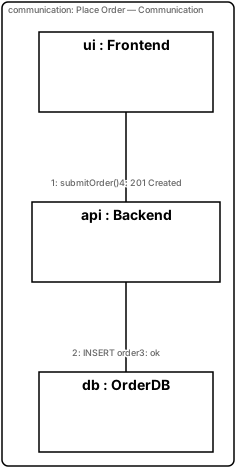
Communication diagrams show the same interaction as sequence diagrams but laid out spatially — lifelines are nodes, numbered messages are edges.
communicationDiagram(name = "Place Order — Communication") {
    val ui  = role(classifierName = "Frontend",  roleName = "ui")
    val api = role(classifierName = "Backend",   roleName = "api")
    val db  = role(classifierName = "OrderDB",   roleName = "db")

    message(from = ui,  to = api, label = "submitOrder()")
    message(from = api, to = db,  label = "INSERT order")
    message(from = db,  to = api, label = "ok")
    message(from = api, to = ui,  label = "201 Created")
}
Profile diagrams
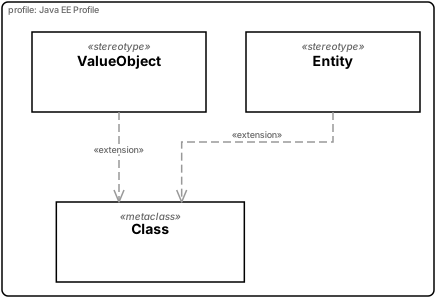
Profile diagrams define stereotypes that extend the UML metamodel. The resulting profile
can be applied to any diagram with applyProfile.
profileDiagram(name = "Java EE Profile") {
    val classMC = metaclass(name = "Class")

    val entity = stereotype(name = "Entity", metaclasses = listOf("Class")) {
        tag(name = "tableName", type = "String")
        tag(name = "schema",    type = "String")
    }

    val valueObject = stereotype(name = "ValueObject", metaclasses = listOf("Class")) {
        tag(name = "immutable", type = "Boolean")
    }

    extension(stereotype = entity,       metaclass = classMC)
    extension(stereotype = valueObject,  metaclass = classMC)
}
See Profiles for applying stereotypes to diagrams and validating tagged-value types.
Timing diagrams
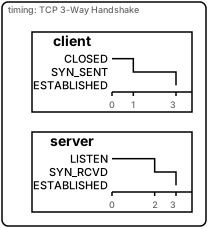
Timing diagrams show how lifelines transition between named states over time. Each
lifeline { tick(t, state) } call sets the state of that lifeline at a given time step.
timingDiagram(name = "TCP 3-Way Handshake") {
    lifeline(name = "client", states = listOf("CLOSED", "SYN_SENT", "ESTABLISHED")) {
        tick(t = 0, state = "CLOSED")
        tick(t = 1, state = "SYN_SENT")
        tick(t = 3, state = "ESTABLISHED")
    }

    lifeline(name = "server", states = listOf("LISTEN", "SYN_RCVD", "ESTABLISHED")) {
        tick(t = 0, state = "LISTEN")
        tick(t = 2, state = "SYN_RCVD")
        tick(t = 3, state = "ESTABLISHED")
    }
}
Interaction overview diagrams
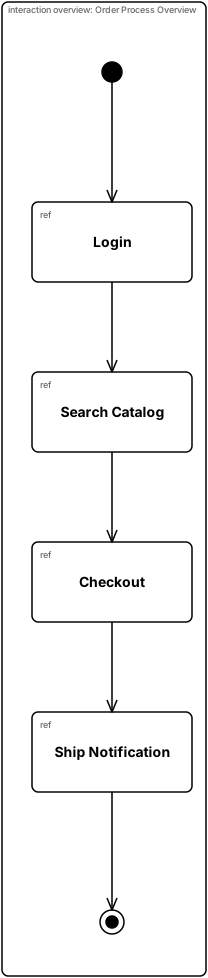
Interaction overview diagrams combine activity and sequence semantics: nodes are
interactionRef placeholders that stand for full sequence diagrams; control flow
(edge) connects them like an activity.
interactionOverviewDiagram(name = "Order Process Overview") {
    val start    = initial()
    val login    = interactionRef(name = "Login")
    val search   = interactionRef(name = "Search Catalog")
    val checkout = interactionRef(name = "Checkout")
    val notify   = interactionRef(name = "Ship Notification")
    val end      = final()

    edge(from = start,    to = login)
    edge(from = login,    to = search)
    edge(from = search,   to = checkout)
    edge(from = checkout, to = notify)
    edge(from = notify,   to = end)
}
Composite structure diagrams
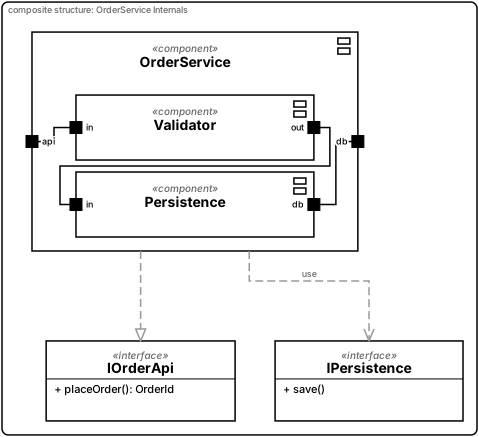
Composite structure diagrams show the internal architecture of a classifier: nested
component parts, port boundary points, and connect calls for delegation and
assembly connectors.
compositeStructureDiagram(name = "OrderService Internals") {
    val orderApi = interfaceOf(name = "IOrderApi") {
        operation(name = "placeOrder") { returns(typeName = "OrderId") }
    }
    val dbApi = interfaceOf(name = "IPersistence") {
        operation(name = "save")
    }

    lateinit var validator: UmlComponent
    lateinit var persistence: UmlComponent

    val service = component(name = "OrderService") {
        port(name = "api"); provides(iface = orderApi)
        port(name = "db");  requires(iface = dbApi)

        validator = component(name = "Validator") {
            port(name = "in"); port(name = "out")
        }
        persistence = component(name = "Persistence") {
            port(name = "in"); port(name = "db")
            requires(iface = dbApi)
        }
    }

    // connect() lives at the diagram (UmlModelScope) level, not inside the
    // component block — capture the nested components via lateinit above.
    // Delegation: boundary port → inner part port
    connect(end1 = service,     port1 = "api", end2 = validator,   port2 = "in")
    // Assembly: part port → part port
    connect(end1 = validator,   port1 = "out", end2 = persistence, port2 = "in")
    // Delegation out: inner port → boundary port
    connect(end1 = persistence, port1 = "db",  end2 = service,     port2 = "db")
}
Composing diagrams
A single script can contain multiple diagrams by wrapping them in umlModel:
umlModel(name = "Order subsystem") {
    classDiagram(name = "Domain") {
        // ...
    }
    componentDiagram(name = "Architecture") {
        // ...
    }
    stateDiagram(name = "Lifecycle") {
        stateMachine(name = "Order") { /* ... */ }
    }
}
Each contained diagram renders to its own SVG when invoked through the CLI or Gradle plugin.