Themes & Configuration
A kUML theme is a typed colour-and-typography object that the renderer reads when drawing. Configuration layering lets you pick a theme — and override individual stereotype styles — without forking the renderer.
Built-in themes
| Name | Character |
|---|---|
|
Black-on-white, no decoration. Pass |
|
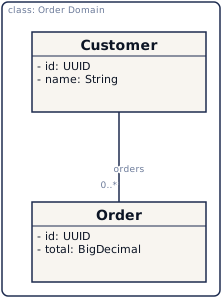
Brand colours, blue accents, Inter font. The "house" theme used in marketing screenshots. Default since v0.20.5 — applied across CLI, Web/Server (Obsidian auto mode), the Gradle plugin, and the Desktop app when no |
|
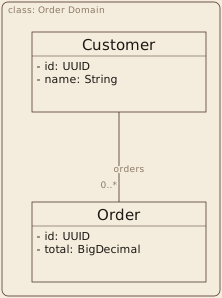
Muted warm greys with dusty-rose accents, serif typeface, restrained corner radii. |
|
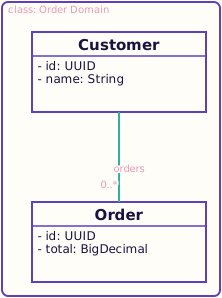
Vivid pastels, coral and teal accents, rounded sans-serif typeface, generous corner radii. |
Apply via CLI flag:
kuml render diagram.kuml.kts --theme elegantOr pin via the Gradle plugin:
kuml {
    theme.set("playful")
}
Theme gallery
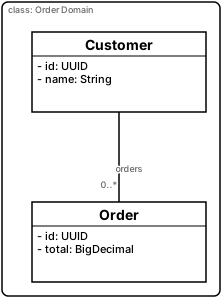
The kUML DSL itself has no theme parameter — themes are a rendering-time concern,
not part of the diagram model. Documentation authors using the kuml-asciidoc Antora
bridge (see the AsciiDoc preprocessor) can still render the
same block once per theme with a per-block theme="…" AsciiDoc attribute — the
diagram DSL below is identical in all four blocks; only the attribute differs.
plain
classDiagram(name = "Order Domain") {
    val customer = classOf(name = "Customer") {
        attribute(name = "id", type = "UUID")
        attribute(name = "name", type = "String")
    }
    val order = classOf(name = "Order") {
        attribute(name = "id", type = "UUID")
        attribute(name = "total", type = "BigDecimal")
    }
    association(source = customer, target = order) {
        source { multiplicity(spec = "1") }
        target { multiplicity(spec = "0..*"); role = "orders" }
    }
}
kuml
classDiagram(name = "Order Domain") {
    val customer = classOf(name = "Customer") {
        attribute(name = "id", type = "UUID")
        attribute(name = "name", type = "String")
    }
    val order = classOf(name = "Order") {
        attribute(name = "id", type = "UUID")
        attribute(name = "total", type = "BigDecimal")
    }
    association(source = customer, target = order) {
        source { multiplicity(spec = "1") }
        target { multiplicity(spec = "0..*"); role = "orders" }
    }
}
elegant
classDiagram(name = "Order Domain") {
    val customer = classOf(name = "Customer") {
        attribute(name = "id", type = "UUID")
        attribute(name = "name", type = "String")
    }
    val order = classOf(name = "Order") {
        attribute(name = "id", type = "UUID")
        attribute(name = "total", type = "BigDecimal")
    }
    association(source = customer, target = order) {
        source { multiplicity(spec = "1") }
        target { multiplicity(spec = "0..*"); role = "orders" }
    }
}
playful
classDiagram(name = "Order Domain") {
    val customer = classOf(name = "Customer") {
        attribute(name = "id", type = "UUID")
        attribute(name = "name", type = "String")
    }
    val order = classOf(name = "Order") {
        attribute(name = "id", type = "UUID")
        attribute(name = "total", type = "BigDecimal")
    }
    association(source = customer, target = order) {
        source { multiplicity(spec = "1") }
        target { multiplicity(spec = "0..*"); role = "orders" }
    }
}
The kuml.config.kts DSL
Project-level defaults live in a kuml.config.kts file at the repo root (or wherever the
CLI is invoked from). The DSL uses the same scripting host as diagram files.
// kuml.config.kts
kumlConfig {
    render {
        theme = "kuml"
        format = "svg"
        widthPx = 1024              // PNG width

        // Override individual stereotype slots without losing other theme defaults
        stereotypes {
            override("Entity") {
                backgroundColor = "#fff7e6"
                borderColor = "#d97706"
            }
            override("Scheduled") {
                showName = false   // Render only tagged values, not the «Scheduled» tag
            }
        }
    }
}
The override DSL uses nullable slots — you only set what you want to change. Untouched fields fall back to the active theme’s value.
Configuration layering
Three layers, highest priority first:
-
CLI flag —
--theme elegant,--format png,--width 2048 -
Config file —
kuml.config.ktsdiscovered in the CWD or via--config <path> -
Built-in defaults —
kumltheme, SVG format, 1024 px width
A higher layer overrides lower layers field by field, not file by file. Setting just
--theme elegant on the CLI keeps your config-file stereotypes { … } overrides intact.
Authoring your own theme
Themes are Kotlin objects implementing KumlTheme:
object CompanyBrandTheme : KumlTheme {
    override val name: String = "company"
    override val colors: KumlColors = KumlColors(
        background = "#ffffff",
        defaultStroke = "#1f2937",
        accent = "#2563eb",
        // ...
    )
    override val typography: KumlTypography = KumlTypography(
        fontFamily = "Inter, sans-serif",
        // ...
    )
    override val borders: KumlBorders = KumlBorders(cornerRadius = 4f)
}

class CompanyBrandThemeProvider : KumlThemeProvider {
    override val name: String = "company"
    override fun theme(): KumlTheme = CompanyBrandTheme
}
Register via META-INF/services/dev.kuml.renderer.theme.core.KumlThemeProvider:
com.example.CompanyBrandThemeProviderCLI and Gradle plugin pick it up:
kuml render diagram.kuml.kts --theme companyStereotype-driven styling
Themes can map stereotypes to drawing slots:
object MyTheme : KumlTheme {
    // ...
    override val stereotypeStyles: Map<String, StereotypeTheme> = mapOf(
        "Entity" to StereotypeTheme(
            backgroundColor = "#fff7e6",
            borderColor = "#d97706",
            showName = true,
        ),
        "Transient" to StereotypeTheme(
            textOpacity = 0.4f,
        ),
    )
}
This is how the JavaEE-styled themes light up @Entity classes differently from
regular classifiers. The renderer queries stereotypeStyles[stereotypeName] when
drawing each element — empty map = no stereotype styling, fallback to the global theme.
Config DSL — kuml-core-config module
The full DSL lives in dev.kuml.core.config.dsl. The top-level entry point is kumlConfig,
nested blocks for render, layout, codegen, and validation will land as needed. The Config
DSL has its own scripting host (KumlConfigScript) — Config scripts cannot accidentally
contain diagram DSL or vice versa.
The CLI’s --config <path> flag accepts both *.kuml.config.kts files and inline JSON via
--config-json '{…}' (V2 — file-based for now).